
Would you let a new starter loose in everyone's email on day one?
That's what switching on an AI connector can do. We connect AI tools to Microsoft 365 and your other systems through connectors we build and look after. You decide what AI can see and do. Every action is logged.
A Microsoft 365 MCP connector lets AI tools like Claude and ChatGPT work with your email, calendars and files. Ours is built for your business. It only allows the actions you approve for the people you approve. It keeps a record of everything it does. We build custom MCP connectors the same way for systems that don't have one.
AI is only as safe as what it's connected to.
Connecting AI to your systems is where it gets useful. It's also where it can see far more than anyone meant it to.
- Staff have switched on the Microsoft 365 connector in their AI tool. Nobody checked what it can reach.
- You couldn't say what the AI has read this week or who asked it to.
- The built-in connector can't do what you need, like sending attachments or properly formatted emails.
- The system you most want AI to help with has no connector at all.
- Apps keep asking for permission to read your Microsoft 365 and you don't have a good answer.
Microsoft 365 first. Then whatever else runs your business.
Your email, calendars and files, on your terms
We build a Microsoft 365 MCP connector that only does what you approve. A support team can read the shared inbox without reaching anyone's personal mail. Reading is the default. Anything that sends, changes or deletes needs your sign-off first.
- Outlook mail, attachments and formatted emails
- Calendars and meetings
- SharePoint and OneDrive files
- Access set per person or team
The systems AI tools can't reach yet
Plenty of the software that runs a business has no AI connector. If it has an API, we can usually build one, with the same controls and the same record of every action.
- Ticketing and job systems
- Knowledge bases and wikis
- Line-of-business databases
- Internal tools you've built yourself
Six steps. We stay for the last one.
- 1
Look at what's connected now
We find out which AI tools your team uses and what they're already connected to. Most businesses are surprised.
- 2
Decide what AI should do
Together we agree which actions are allowed, for whom and on which data. Plain English, not a permissions spreadsheet.
- 3
Build the connector
We build it to that list and nothing more. Reading comes first. Anything that sends or changes something is added only when you approve it.
- 4
Connect your AI tools
Claude, ChatGPT and agents you build connect through it. MCP is an open standard, so you're not locked to one AI vendor.
- 5
Log and watch every action
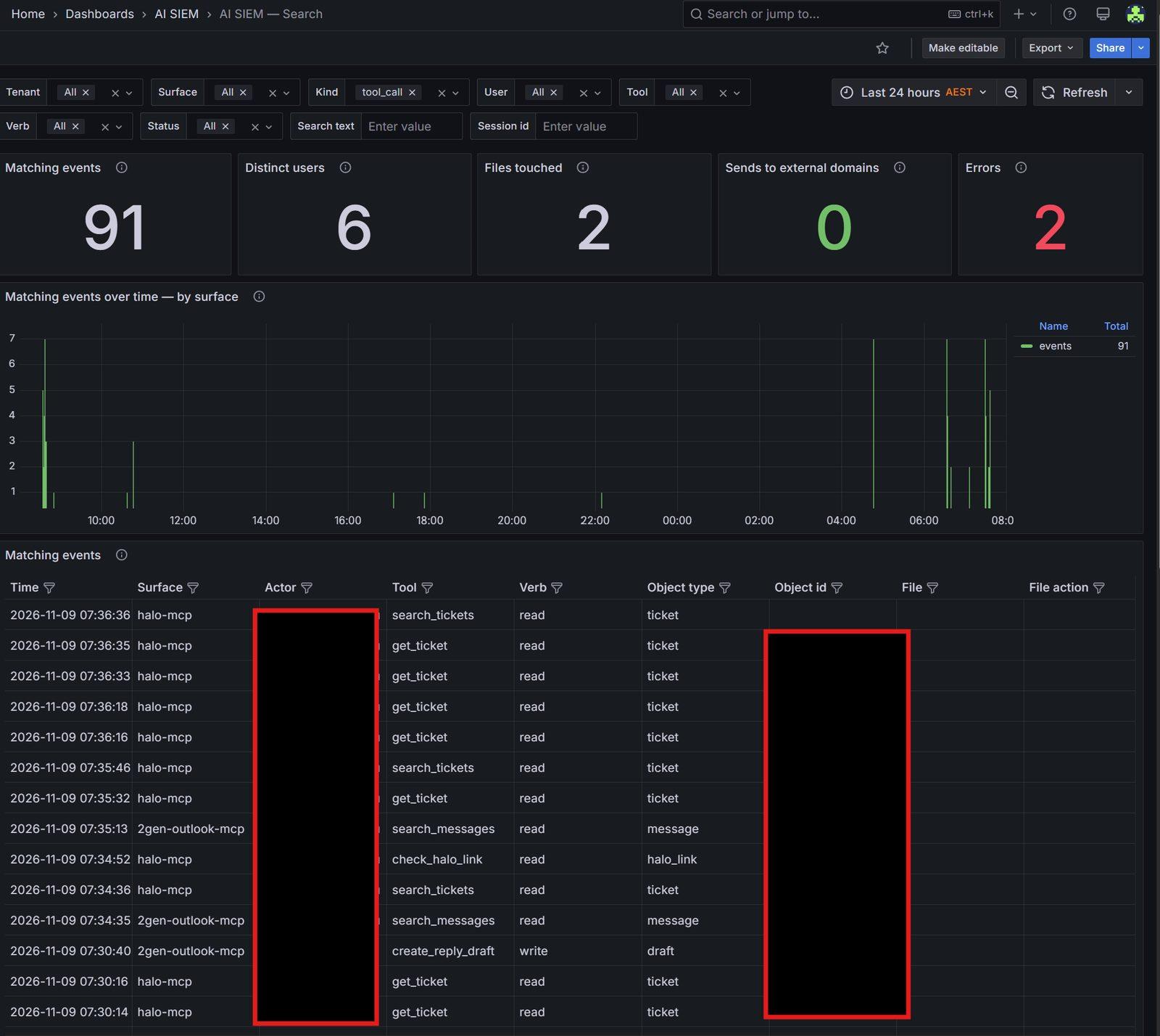
Every call goes into our AI monitoring: who asked, which tool ran and what it read or changed.
- 6
Look after it
Systems change and so do your needs. We keep the connector working, update it and switch things off when you ask.
A built-in connector next to one of ours.
| Built-in AI connector | 2Gen MCP connector | |
|---|---|---|
| What AI can reach | Whatever the person who switched it on can reach | Only the actions and data you approve |
| Different people, different access | Everyone gets the same | Set per person or team |
| Sending and deleting | Often available straight away | Off until you approve it |
| Record of what happened | In the AI vendor's console, if anywhere | Every action logged in our AI monitoring |
| Systems with no connector | Not possible | Built to order |
| Switching it off | Through each AI vendor, one by one | One switch, yours |
Built for our own business first.
We connect Claude to our own ticketing, email, knowledge base and project tracking through connectors we built. We built our own email connector because the built-in one couldn't handle attachments or properly formatted emails.
Every one of them runs through the same monitoring. Here's a real 24 hours of it. The entries are our own ticketing and email connectors at work.
- AI tools that can safely use your email, calendars and files
- Connectors for the systems that matter to your business
- A clear list of what AI can and can't do, in plain English
- A record of every AI action you can look back on
- One place to change access or switch it off
- Someone looking after it as things change
How the connector holds your credentials, filters what comes back and serves several AI tools at once is all on our MCP Gateways page. Pair it with AI knowledge management and your AI tools can answer from your own processes too.
What people usually ask.
What is an MCP connector?+
MCP stands for Model Context Protocol. It's an open standard that lets AI tools like Claude and ChatGPT use other systems: read an email, look up a customer or create a ticket. An MCP connector (sometimes called an MCP server) is the piece that links an AI tool to one of those systems.
Is the built-in Microsoft 365 connector safe to use?+
It can be, but it reaches whatever the person who switched it on can reach. The record of what it did usually sits with the AI vendor, not with you. That's fine for one person trying things out. It's a lot to accept across a whole business.
Does the AI tool get our Microsoft 365 password or access?+
No. Our connector holds the connection to Microsoft 365. The AI tool connects to the connector and only gets the results of the actions you've allowed.
Which AI tools does it work with?+
Claude and ChatGPT, plus other tools that support MCP and agents you build yourself. One connector serves all of them, so there's one place to set the rules.
Can you build a connector for a system that isn't listed?+
Usually, yes. If the system has an API, we can build an MCP connector for it. We'll check what the system allows before we promise anything.
Can we see what the AI has been doing?+
Yes. Every action through the connector is logged: who asked, which tool ran and what it read or changed. It's the same monitoring we run on our own AI tools.
What happens after we get in touch?+
We'll read what you've sent and look at where your business is and what you want to fix. If we need more detail, we'll ask. If we think we can help, we'll set up a conversation. If we're not the right fit, we'll tell you straight.
Got this problem?
Tell us which AI tools your team uses and what they're connected to. We'll be straight with you about what that exposes and how we'd help.