
What happens when the person who knows how everything works leaves?
We get that knowledge out of people's heads and into a system your whole team can use, with AI that answers from it safely. So when someone leaves, the business doesn't have to learn everything again.
AI knowledge management is how we capture what your business knows (its processes, decisions and the know-how in people's heads) in a secure knowledge base. Your staff can search it or ask an AI assistant about it. The AI only sees what you approve and every access is logged.
Your business knowledge is worth more than you think.
Most businesses have years of know-how sitting in a few people's heads. It works fine until someone is away, someone new starts or someone leaves.
- There's one person everyone asks. You'd struggle if they left.
- New staff take months to learn how things are really done.
- Processes live in inboxes, old documents and people's memories.
- The same questions get answered again and again.
- You'd like AI to help, but not with open access to everything.
Six steps. We stay for the last one.
- 1
Discover
We work out which knowledge and processes matter most, who holds them and where they live today.
- 2
Capture
We get it written down and organised in a knowledge base, starting with what would hurt most to lose.
- 3
Make it usable
Staff can search it or ask questions in plain English and get answers that point back to the source page.
- 4
Connect carefully
AI tools reach the knowledge base through a connector we build, exposing only what you approve to the people you approve.
- 5
Protect and audit
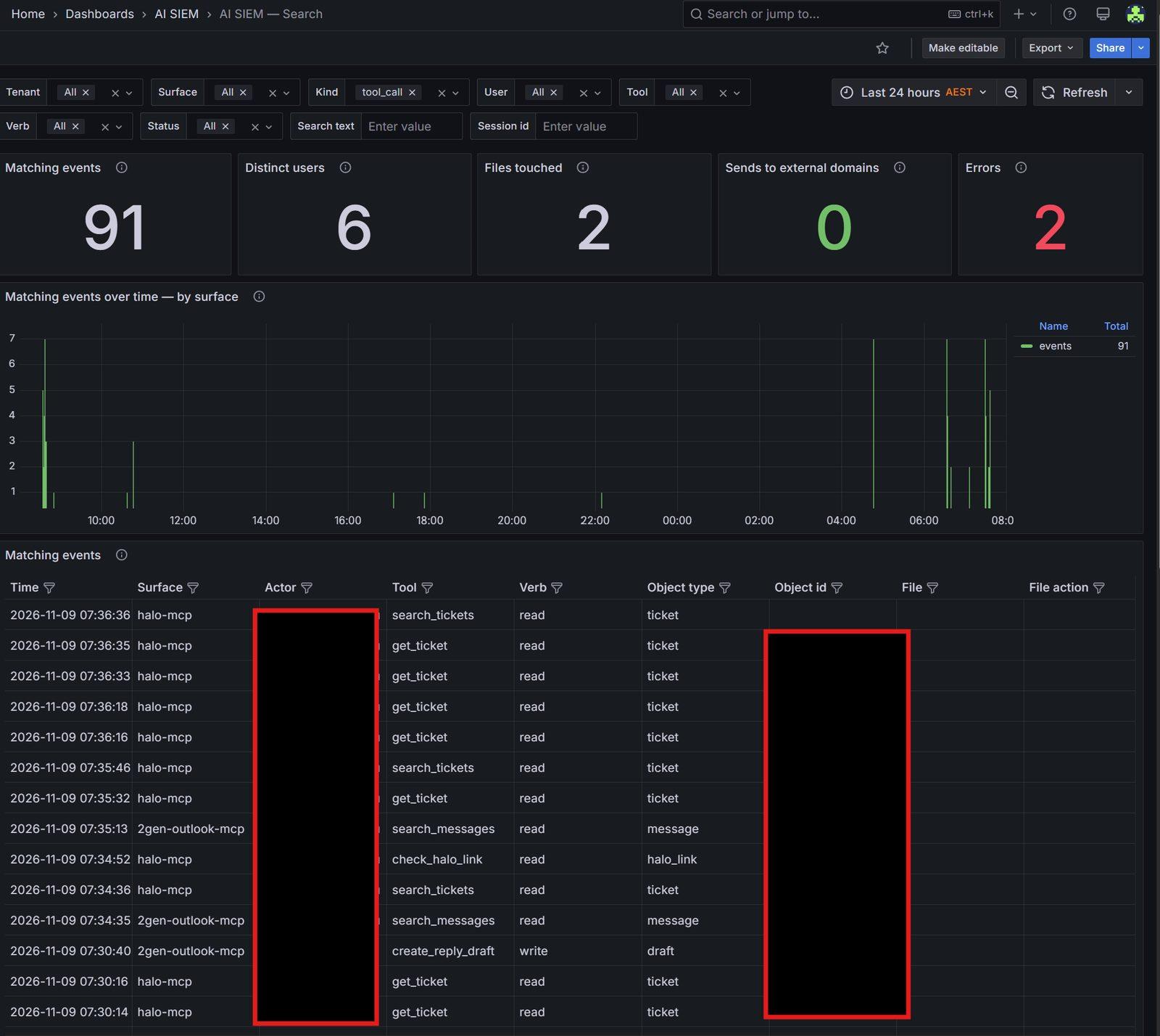
Every AI search and read is logged: who asked, what was read and when. You can see it. So can we.
- 6
Look after it
We keep it current as your business changes and help your people keep adding to it.
From a quick request to an answer your staff can check.
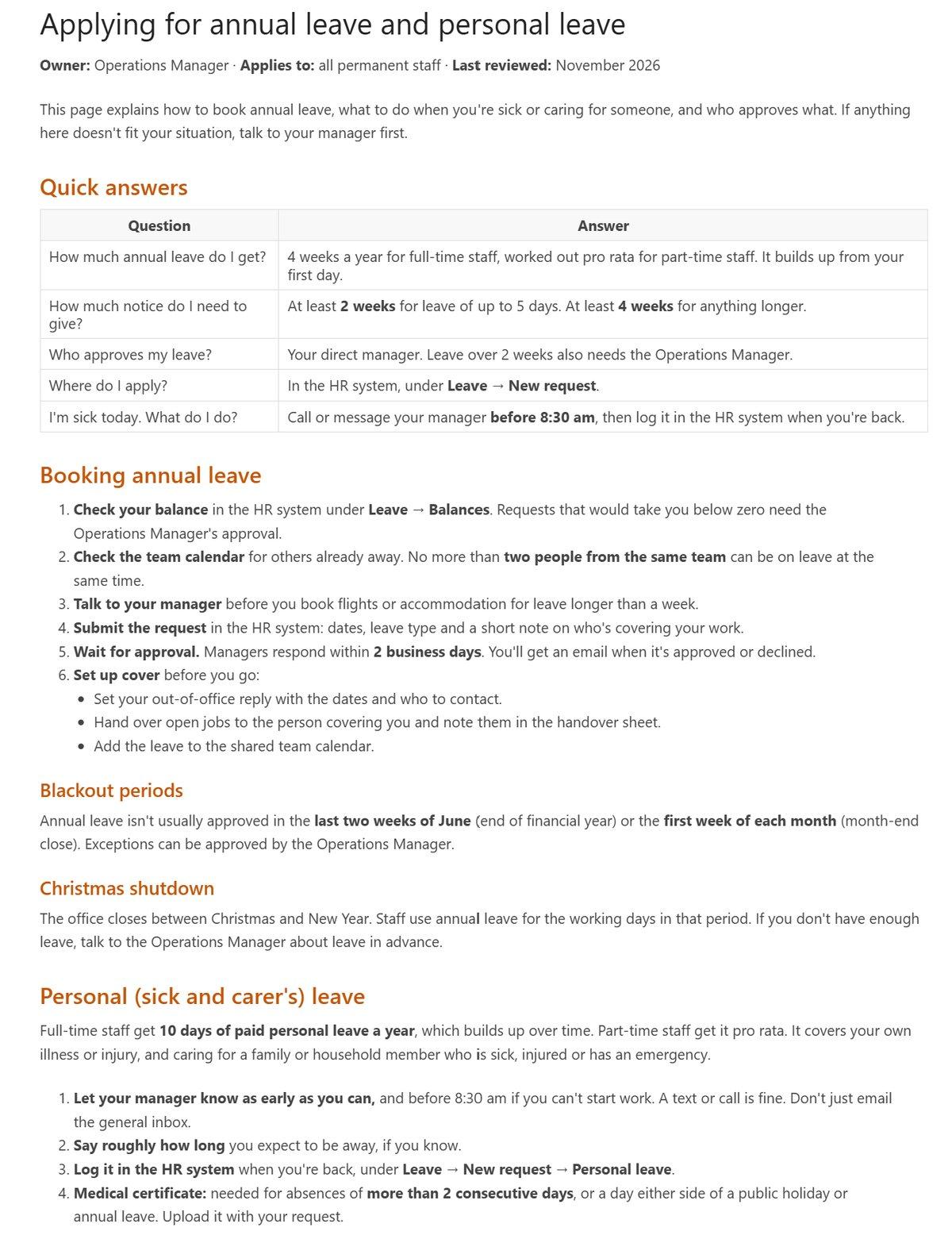
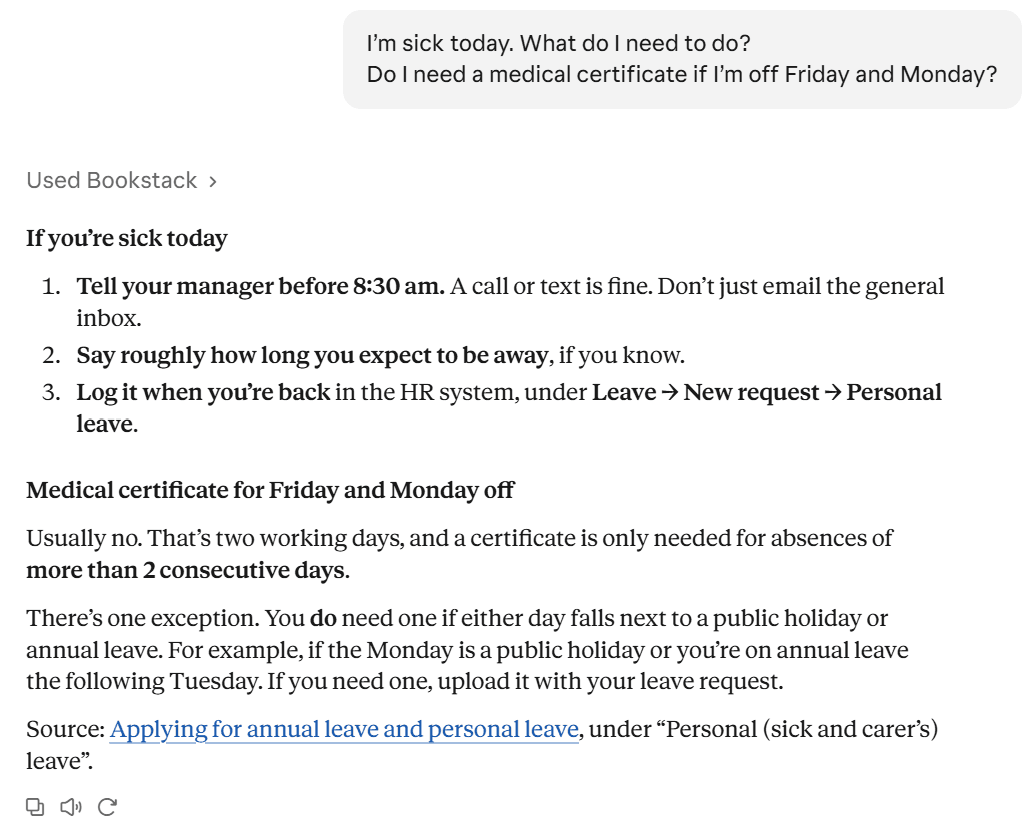
Here's one process, a staff leave procedure, going through our own setup. These are real screenshots from our BookStack and Claude, using a sample procedure.
- 1
A manager asks Claude to write it up
No template to fill in and no blank page. Claude drafts the procedure in plain English.

- 2
It lands in your knowledge base for review
The draft goes into BookStack, not straight to staff. Someone checks it and publishes it when it's right.
 3
Staff ask questions and get answers with the source
Claude looks it up in BookStack, answers in plain English and links back to the page, so anyone can check it. Each lookup is logged.
The same setup we run on our own business.
You don't need to know any of this to get the benefit. It's here for the people who want to see what they're buying.
BookStack
An open-source knowledge base built for documenting how a business runs. It's what we use for our own processes. It exports to standard formats, so your knowledge isn't locked to us.
Claude, on business accounts
Staff ask questions and get answers drawn from your approved pages, with the source shown so they can check it. If your business already uses another AI tool, we'll talk through what fits.
A secured connector we build
The AI never gets open access. Our connector exposes only the actions you approve and scopes them to each person.
Monitoring on every AI action
Every call through the connector lands in our AI monitoring, the same system we run on our own tools.
- Your key processes and know-how written down and organised
- A knowledge base your team can search and add to
- AI answers drawn from your approved content, with sources
- Access controlled per person, with every AI action logged
- Simple guidance for staff on using it and checking answers
- Someone looking after it as the business changes
Once your knowledge is organised and protected, it becomes the foundation for what comes next: automations, connected systems and AI assistants that know how your business works. You don't have to commit to any of that up front.
What people usually ask.
Do we need to be using AI already?+
No. Plenty of businesses start here because it's a safe first step. Your team gets a knowledge base they can use straight away, with or without AI.
Will the AI be able to see everything in our business?+
No. It only reaches the knowledge base, through a connector that exposes the actions you approve. Access is set per person and every AI search and read is logged.
Who owns the knowledge base?+
You do. It's your content. BookStack exports to standard formats, so it isn't tied to us.
How long does it take?+
It depends how much there is to capture and how many people hold it. We scope it with you first and give you a timeframe before anything starts.
Which AI tool do you use?+
We use Claude ourselves and set it up that way by default. If your business is already committed to another tool, we'll talk through what fits.
Why do we have to apply?+
Doing this properly takes time with each business, so we only take on as many new clients as our team can genuinely support. The application helps us both see whether it's a good fit.
We take on a small number of new clients at a time.
Doing this properly takes time. We need to understand your business, build what fits and then look after it. So we only start with as many organisations as our team can genuinely support.
We're usually a good fit if you:
- Run on defined processes, but plenty are still manual
- Have data spread across different applications
- Care about security and want things done properly
- Are ready to invest in technology and want a long-term partner
- 1Tell us about your business.A few short questions about what you do and what's getting in the way.
- 2We review your application.We look at where your business is and what you want to fix. If we need more detail, we'll ask.
- 3We tell you straight.If we think we're a fit, we'll book a conversation. If we're not, we'll tell you that too.